Made in Melbourne · In use on real jobs

Done on site. Not at the kitchen table.

Fabrum is the site app for subcontractors. Day dockets the builder signs on the spot, ITPs with photo proof, timesheets, leave and drawings, on every phone, iPad and computer.
No card needed · Founding crews lock in their rate
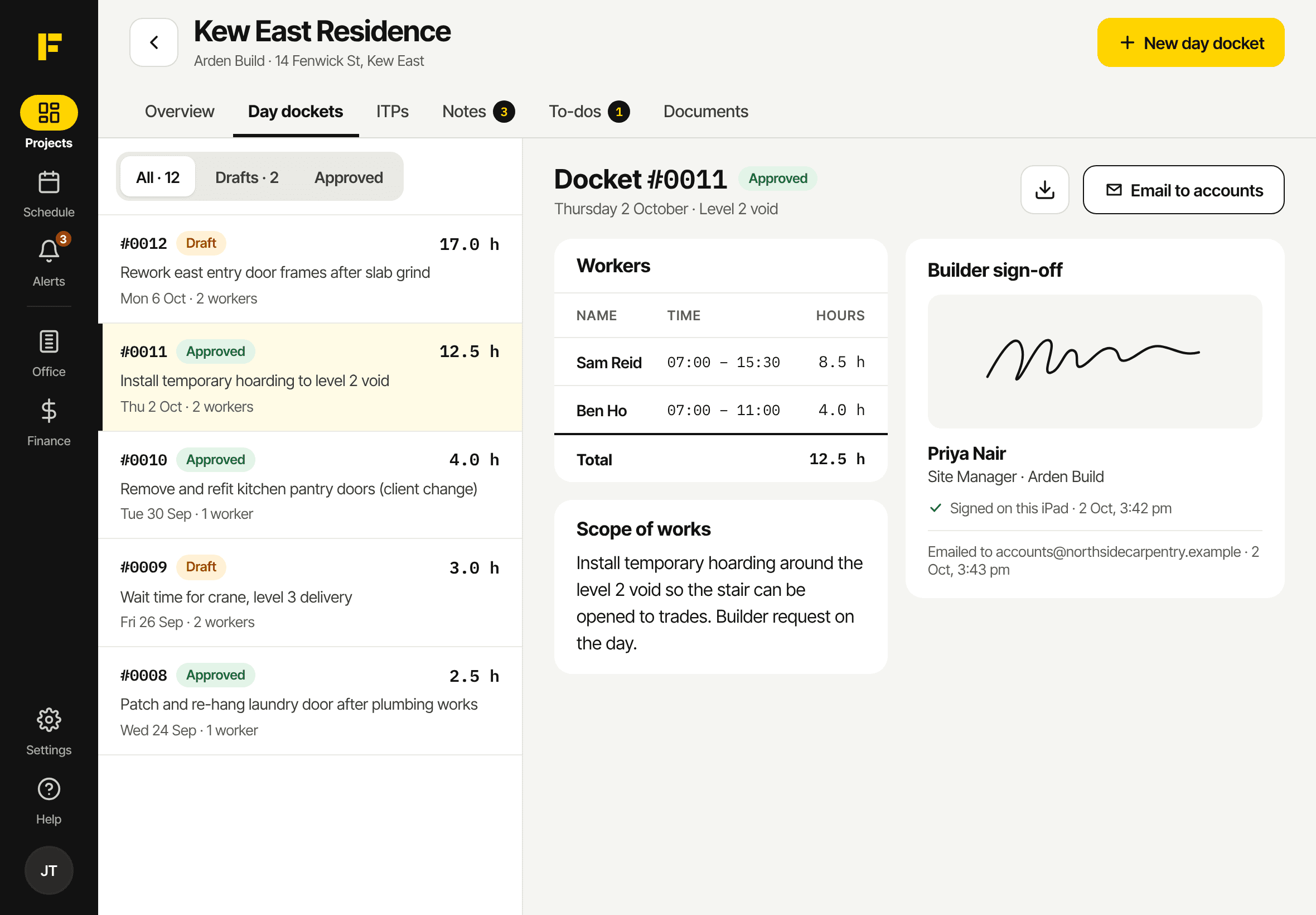
Day dockets on an iPad: the docket list beside a docket signed by the site manager
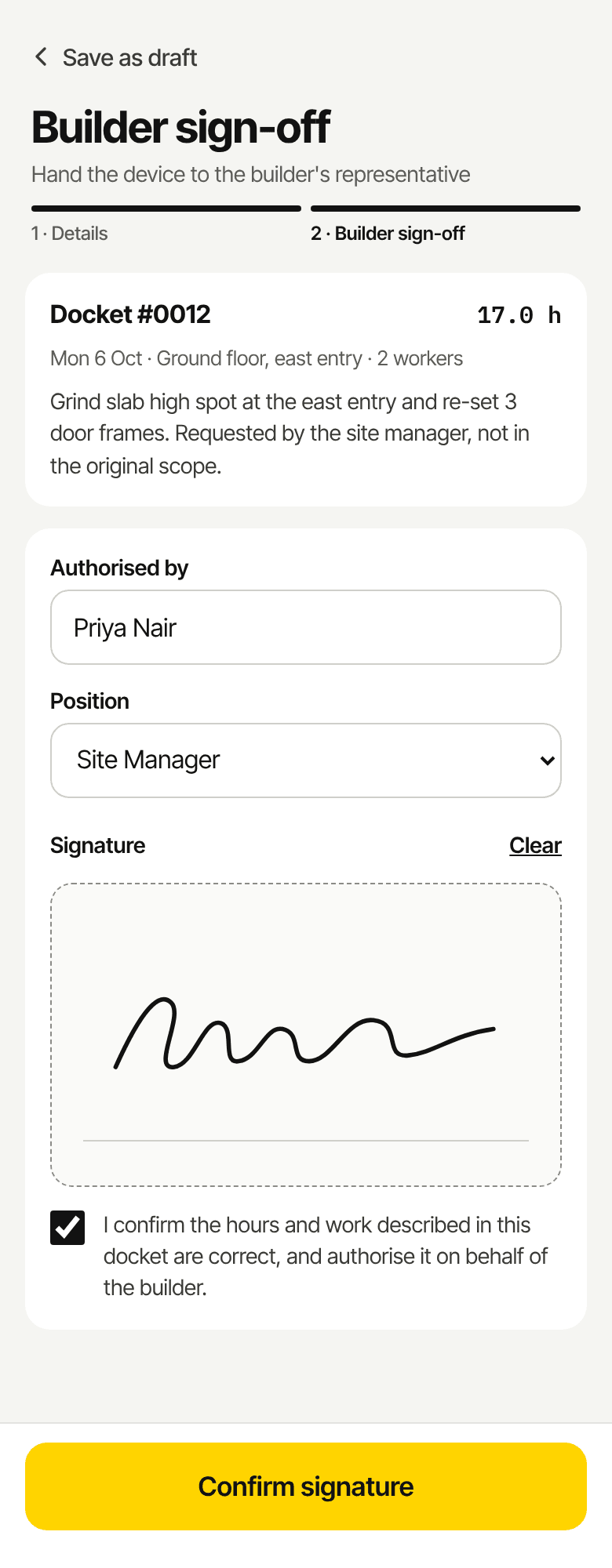
Builder sign-off on a phone: the docket, the builder's name and a signature
The problem

The job's finished. The paperwork isn't.

Most crews do the work properly, then lose money on the paperwork: extras nobody signed, ITPs ticked off from memory, and timesheets chased every Friday.

Extras nobody signed for

Extra work done on the builder's say-so, then argued about weeks later when the invoice goes in.

The builder signs a day docket on your phone before you leave, and accounts get the PDF straight away.

ITPs filled in from memory

Checklists ticked off in the ute on Friday, with the photos lost somewhere in someone's camera roll.

Every item is checked as it's done, with the photos and videos attached to it.

Hours on the back of a docket book

Timesheets chased every week, leave asked for by text, and payroll pieced together on a Sunday night.

The crew clock in to the job and the task, and approved leave flows into the payroll export.
How it works

One app for the crew and the office.

Five jobs Fabrum takes off your plate, from the first docket on site to the final budget in the office.

01 / Day dockets

Get the extra work signed before you leave site.

Write the docket on your phone, hand it to the site manager, and they sign with their finger. Or send them a signing link instead. The signed PDF goes to your accounts inbox.
  • Signed on your device, or by a one-time link the builder opens on theirs
  • Hours worked out from start and finish times, to the nearest 15 minutes
  • Need to fix one? Unlock it, correct it and get it signed again. Every version is kept
  • Re-sent dockets are marked Amended, so nothing gets billed twice
Builder sign-off on a phone: the docket, a signature and a Confirm signature button
Signed on your phone
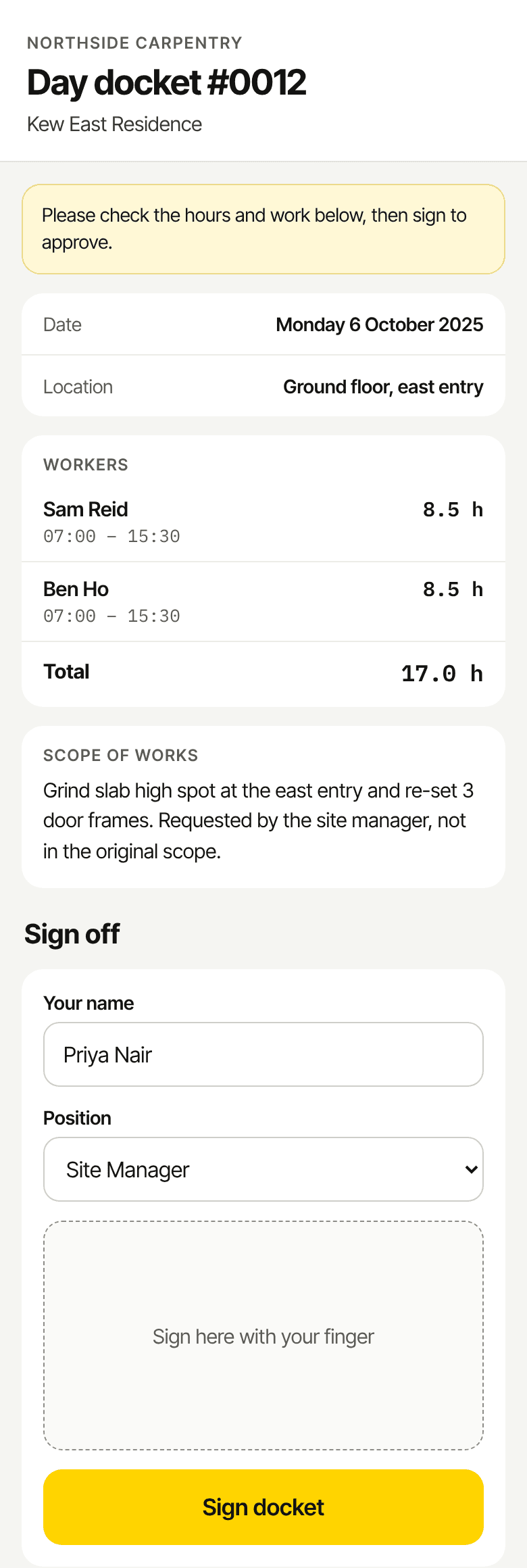
The signing page a builder opens from a link: docket number, date, workers and hours
Or by a signing link
02 / ITPs

ITPs with the proof attached.

Work through every item, room or unit as the work goes in. Pass, fail or N/A with photos on the spot, and extra checks that only show up where they apply.
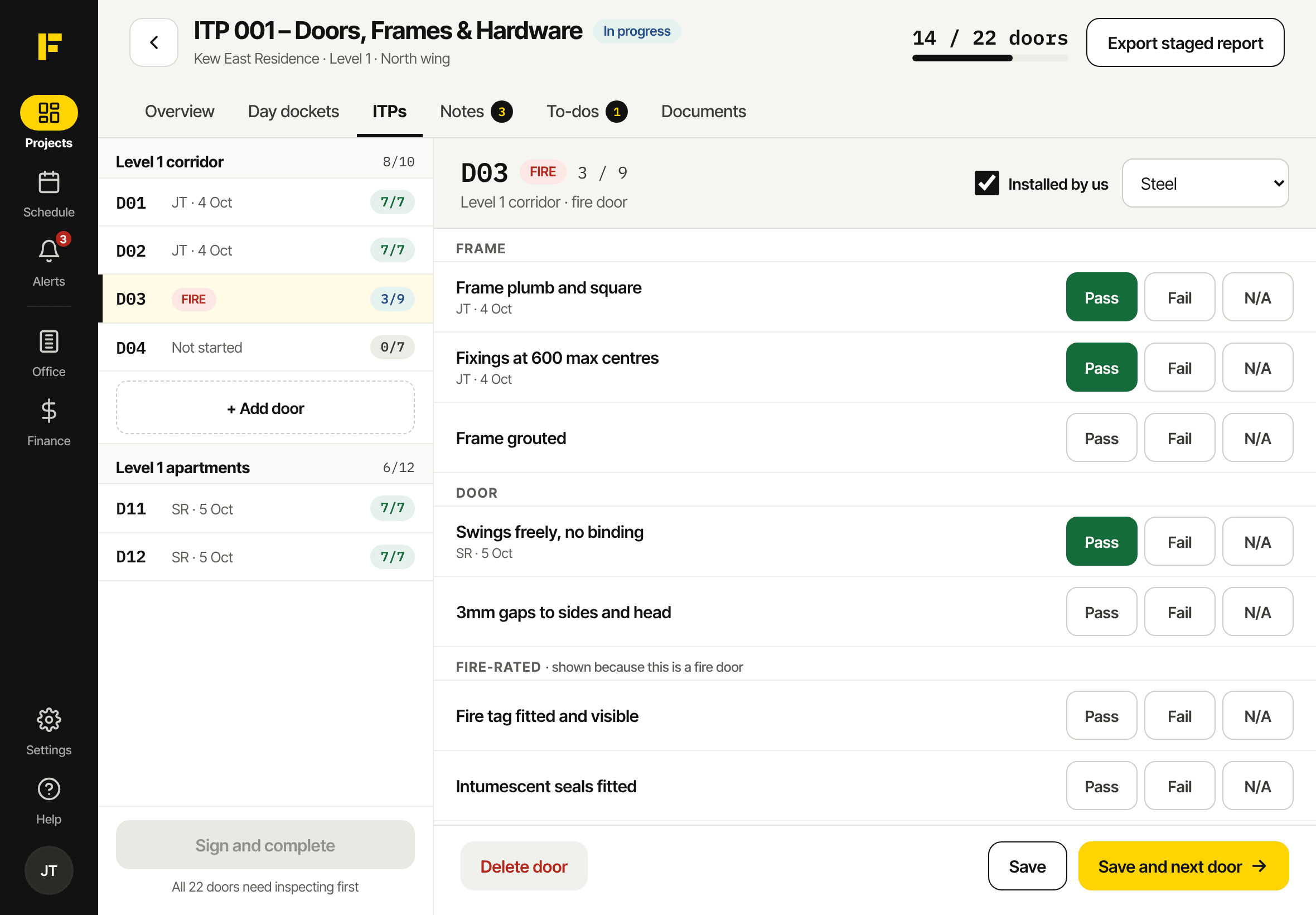
  • Up to 20 photos or videos on every item
  • Use the built-in templates or build your own
  • Export a staged ITP report for each progress claim
  • Duplicate an ITP for the next level in one go
A door ITP on an iPad: doors listed by area with progress, and pass, fail or N/A checks for fire door D03
03 / Time and schedule

Know who's on which site, and what they're doing.

The office builds the week. The crew see where they're going, clock in to the job and the task, and finish the day with a quick production summary.
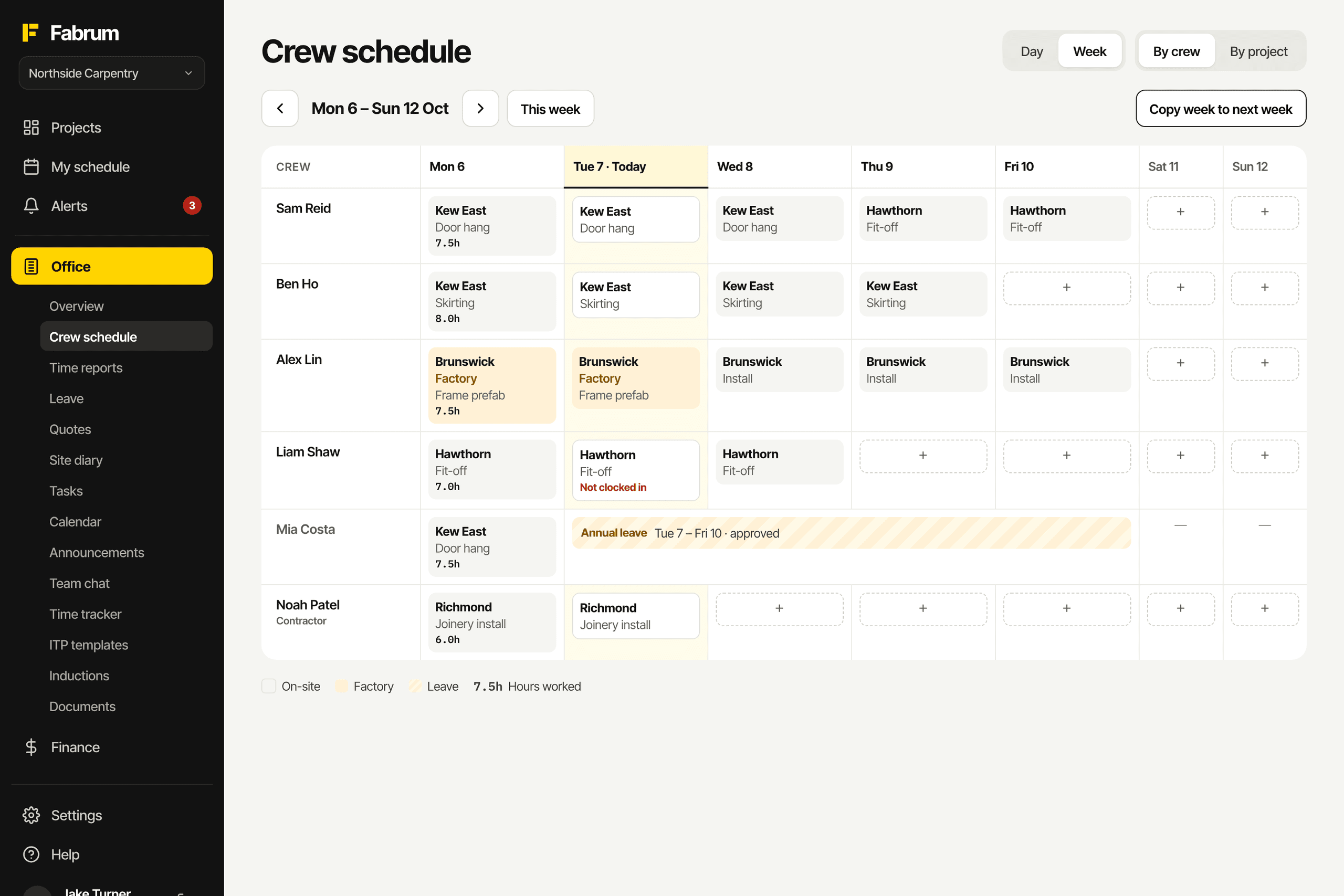
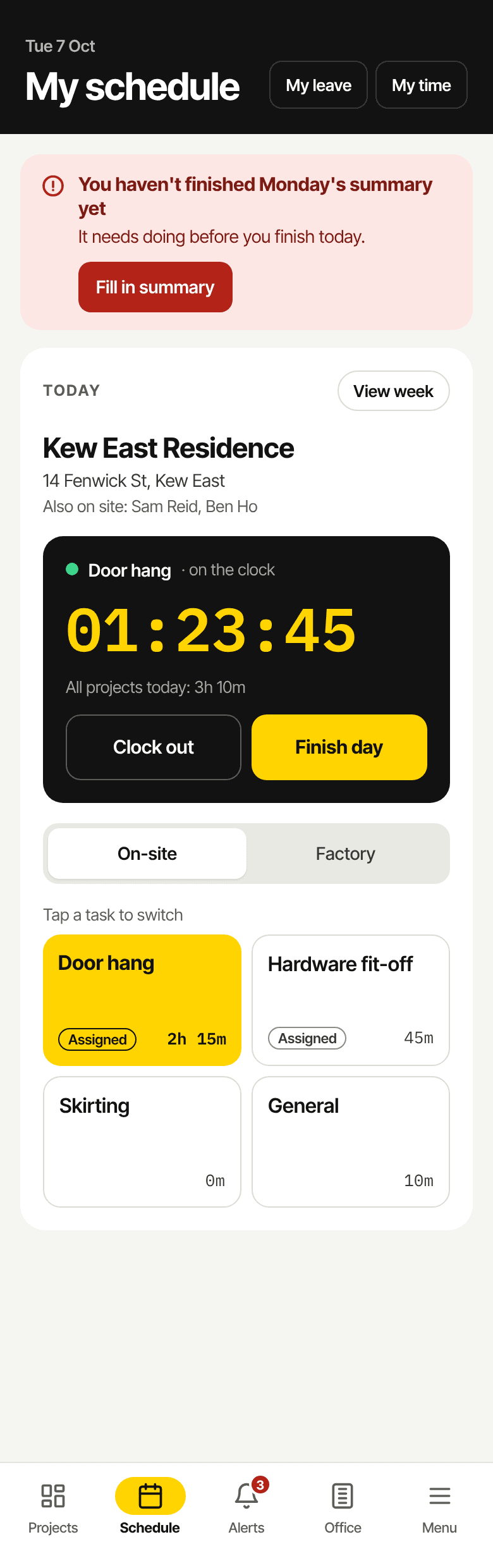
  • Clock in per project and task, on site or in the factory
  • Overtime asks for a reason before the clock starts
  • A roll-call after start time shows who hasn't clocked in
  • Leave and sick days go into time reports and the payroll CSV
The crew schedule for the week: each person's site and task for every day, with leave and factory days marked
My schedule on a phone: today's site, a running clock for door hanging, and task buttons
04 / Drawings

The current drawing. Every time.

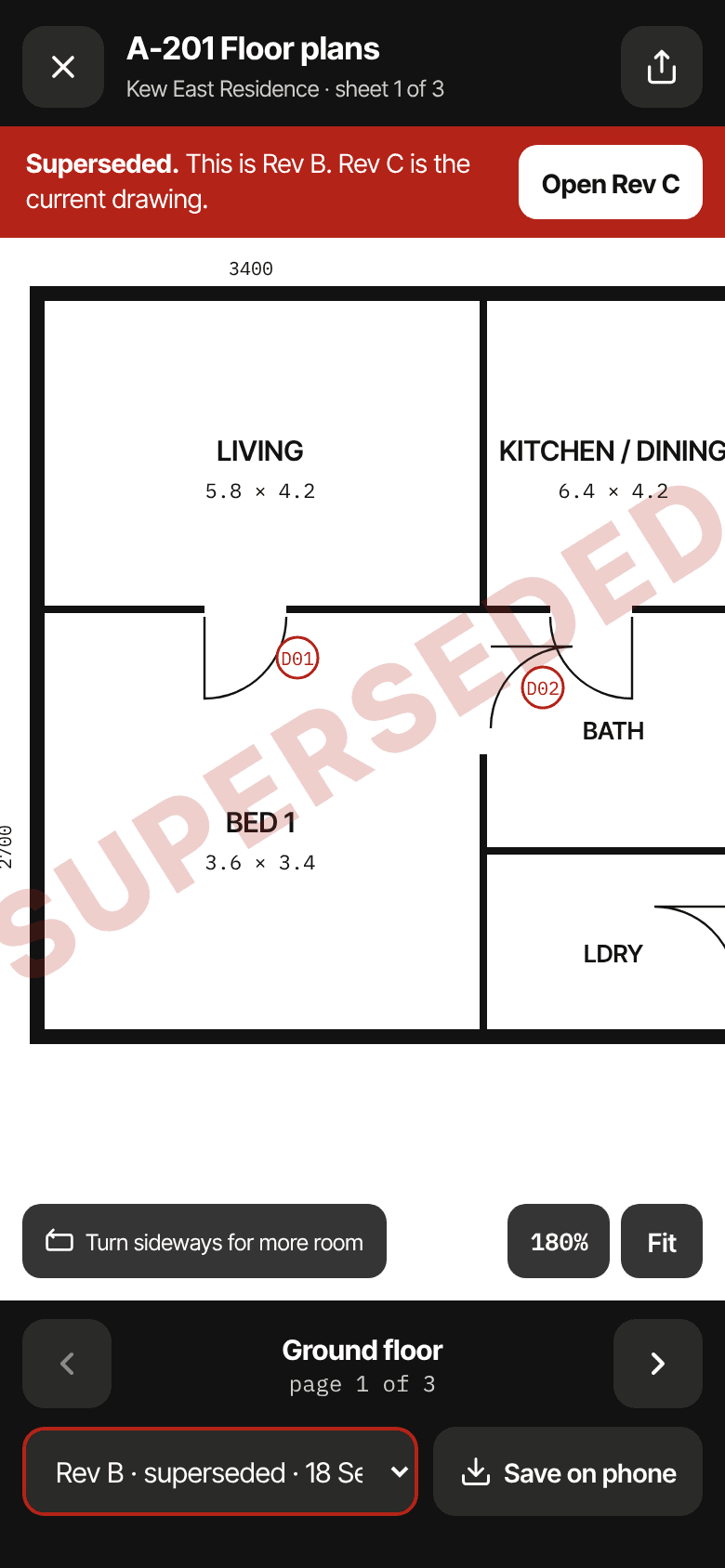
Drawings open full screen on the phone, iPad or computer. An old revision is stamped Superseded, with one tap to the current one, so nobody builds off Rev B.
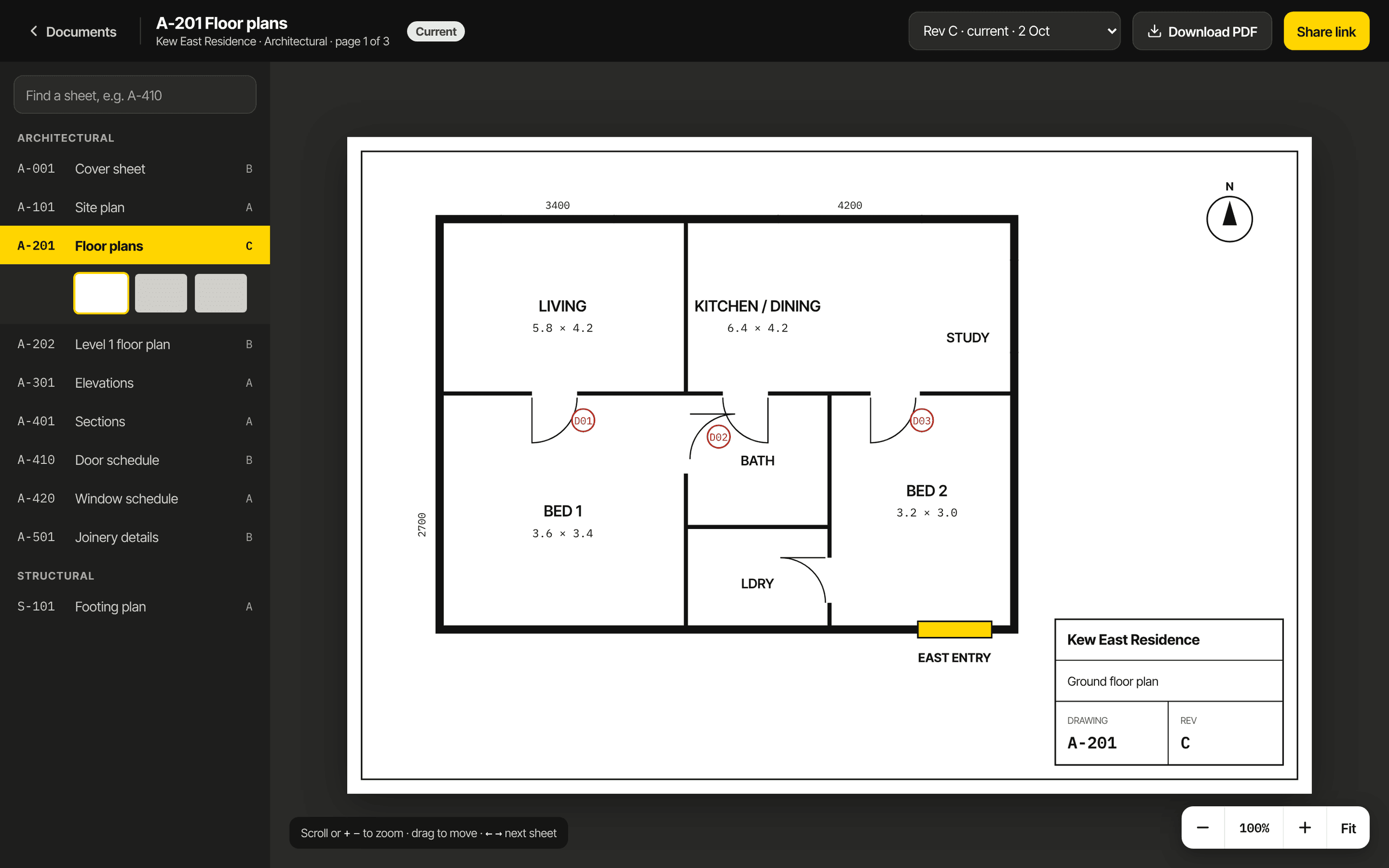
  • Linework stays sharp at any zoom, even on A1 sets
  • Upload full drawing sets up to 250MB
  • Find a sheet by number on the computer, like A-410
  • Only people on the project can open them
The drawing viewer on a computer: a searchable sheet list beside floor plan A-201
An old revision open on a phone, with a red Superseded banner and an Open Rev C button
05 / Office and finance

The office side, without the spreadsheets.

Quotes, budgets, variations and inductions sit with the job, so the numbers match what actually happened on site.
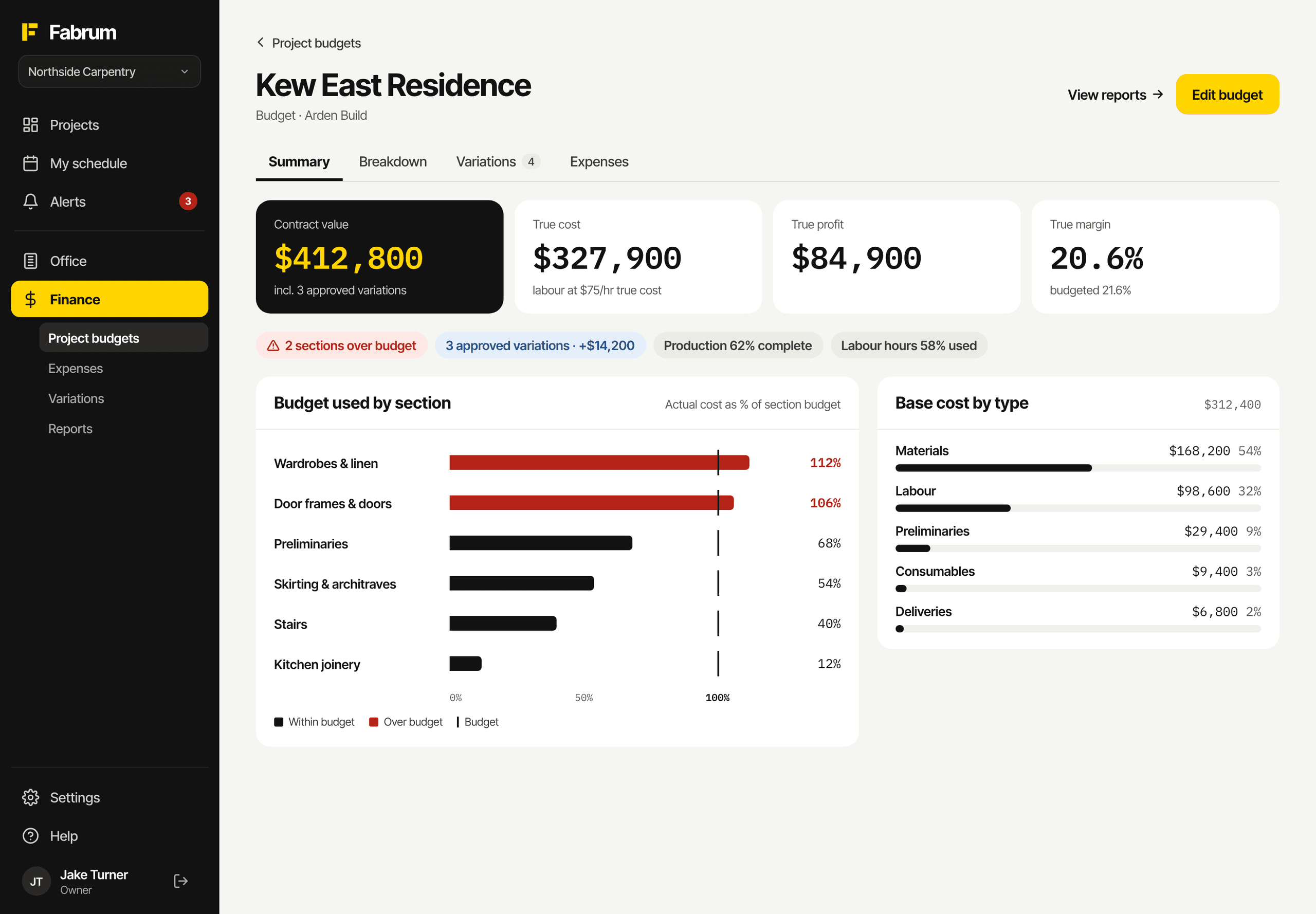
A project budget: contract value, true cost, profit and margin, and budget used by section

Quotes

Client-ready PDFs on your letterhead, a pipeline from draft to awarded, and follow-up reminders.

Budgets

Import from Excel, then track cost against budget by section and see your true margin.

Variations

Every variation on every job in one list, with sale, cost and profit.

Inductions

Step-by-step company inductions, with a register of who's current and who isn't.

White cards and licences

Store each person's cards, insurance and licences, with reminders before they expire.

The rest of the office

Site diary, tasks, calendar, announcements and team chat, all in the same place.

Every screen

One app on the phone, the iPad and the computer.

Crews use their phones, site leads use an iPad, and the office uses a computer. Same login and the same jobs, laid out for each screen.
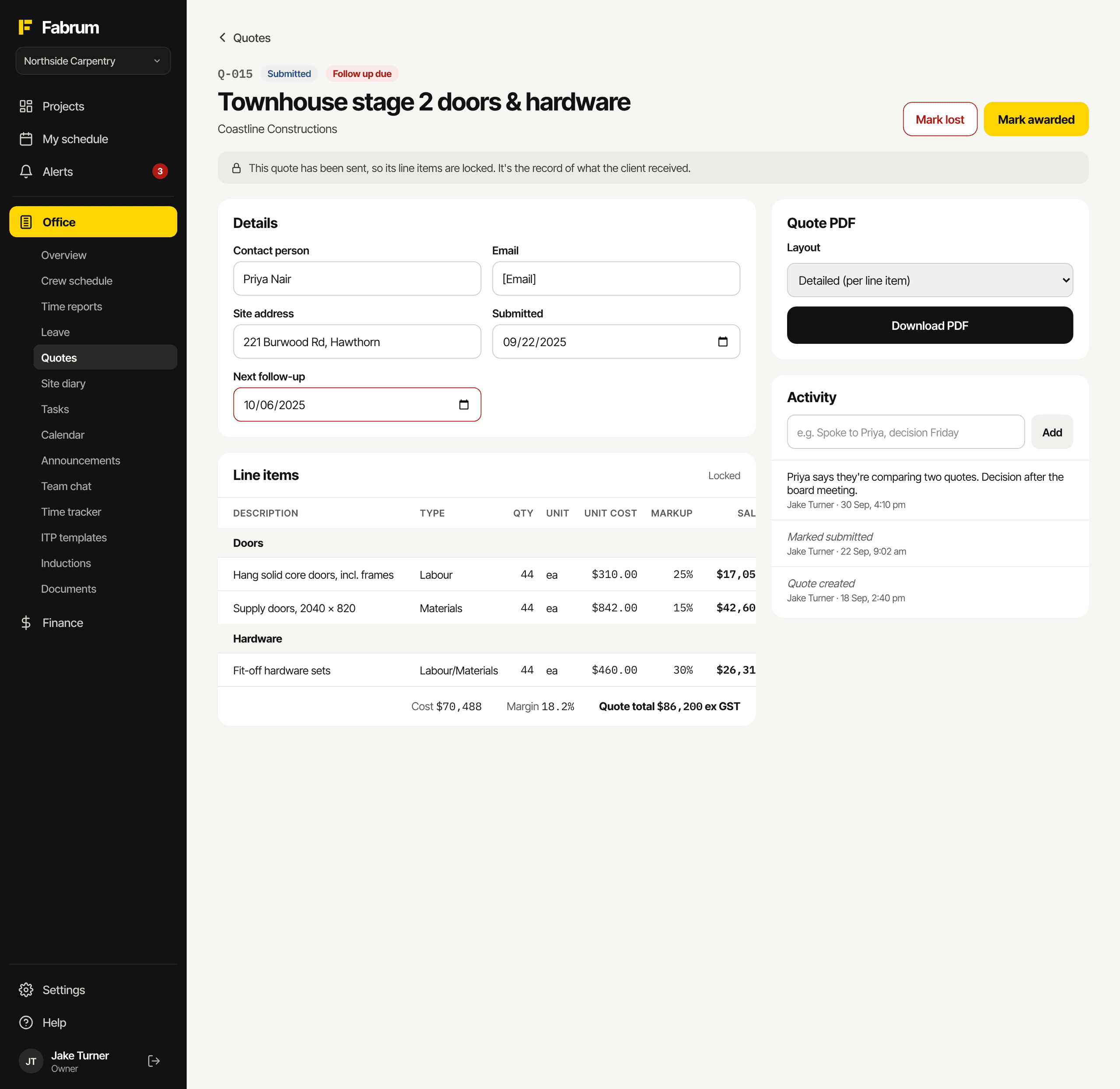
A quote on a computer: details, priced line items, PDF download and an activity feed
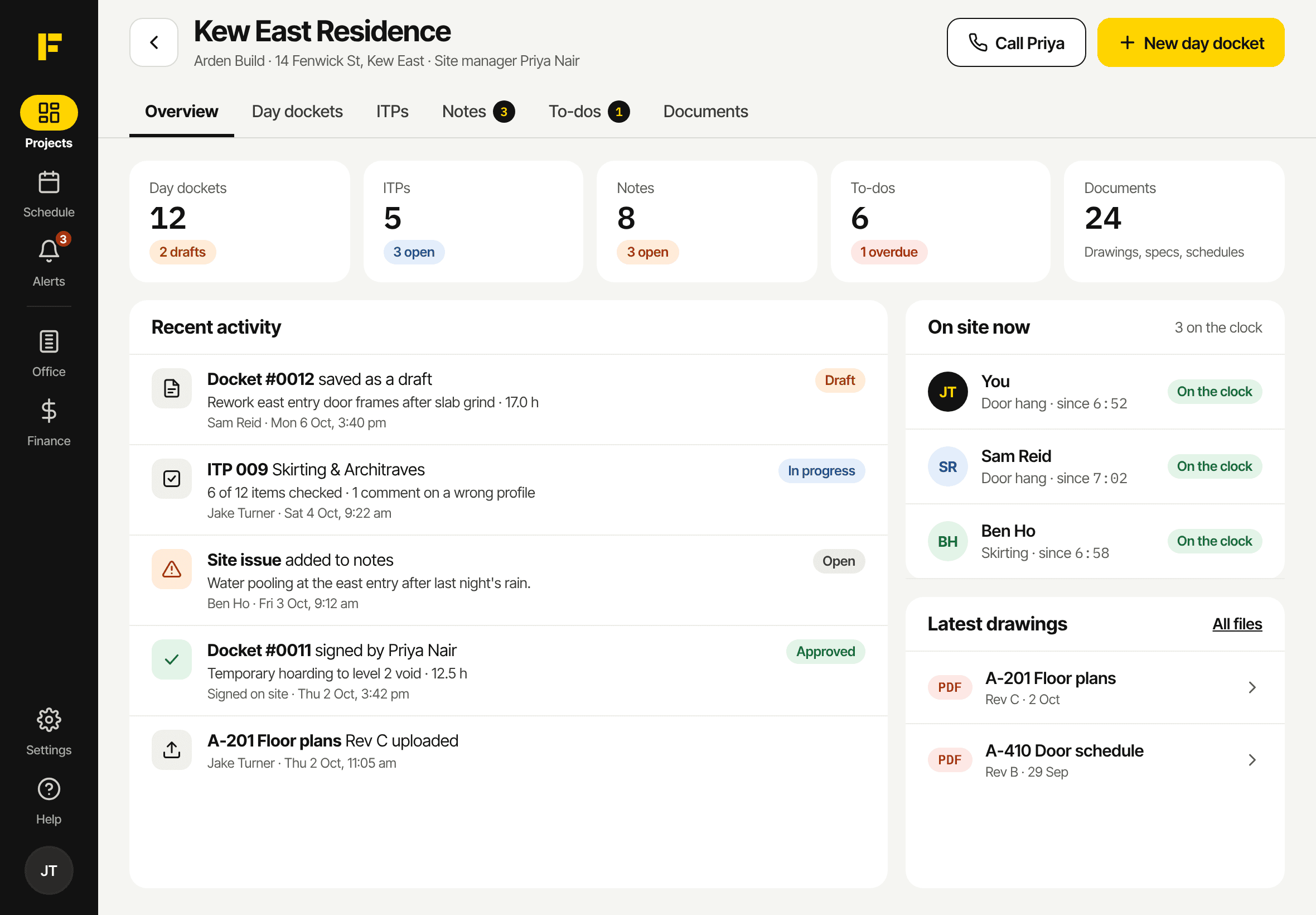
A project overview on an iPad
The projects list on a phone
  • Works in any web browser today
  • iPhone and Android apps coming soon
  • One login on every device
Who's behind it

Built by people who work in construction.

Fabrum is made in Melbourne by people from the construction industry, and it's in use on real jobs every day. New features get tried on site before anyone else sees them.

When you ask for something, you're talking to the people who build it.

  1. Australian terms

    Day dockets, variations, ITPs, white cards and toolbox talks. No change orders or punch lists.

  2. Made for site, not a desk

    Big buttons, text you can read in sunlight, and photos and drawings that retry through dead spots.

  3. Your paperwork, out when you need it

    Dockets, ITPs, quotes and site diaries as PDFs, and hours as a payroll CSV.

  4. Private by default

    Drawings and documents only open for people who are logged in and on the project.

Founding crews

Be one of the first crews on Fabrum.

Register for early access. Founding crews get the beta first, a say in what we build next, and a rate that's locked in.